Signature: The Modern Display Font That Feels Like a Handshake
In the crowded world of design assets, finding a typeface that balances bold presence with genuine approachability can feel like searching for a needle in a haystack. Many premium fonts lean heavily into stark minimalism, sacrificing warmth, while others prioritize whimsical flair at the cost of legibility. The Signature font, however, occupies a distinct and valuable middle ground. It is a bold, uniquely simple modern display font that leverages minimalist, geometric curves to create a friendly yet highly memorable look. For designers, entrepreneurs, and content creators, understanding how to deploy this typeface can be the key to unlocking a more engaging brand identity.
The Visual Language of Geometric Simplicity
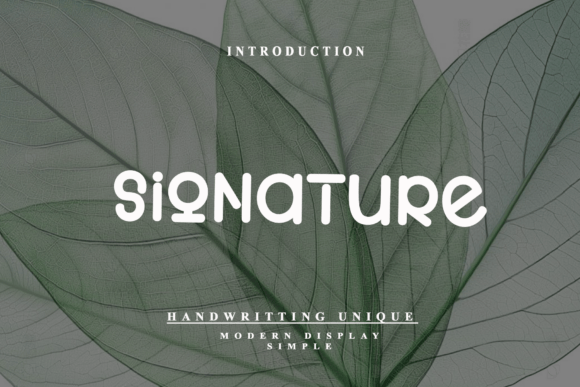
At first glance, the Signature typeface feels familiar, yet distinctly new. Its construction is rooted in the principles of sans serif font design, but it takes a detour into playful territory. The defining characteristic of Signature is its monoline stroke weight. Unlike traditional serif fonts that use thick and thin transitions to guide the eye, Signature maintains a consistent line thickness throughout every letterform. This creates a rhythmic, steady visual flow that feels incredibly clean and modern.
Furthermore, the font replaces sharp, aggressive angles with smooth, rounded terminals. The letters do not end in blunt cuts or sharp serifs; instead, they curve gently inward, mimicking the soft geometry of pebbles polished by water. This design choice removes the "corporate stiffness" often associated with standard sans serif fonts. It transforms the text into something that feels tactile and organic. The result is a typeface that is assertive enough to command attention on a poster or billboard, yet gentle enough to feel inviting on a baby shower invitation or a boutique website.
When you look at the overall silhouette of a block of text set in Signature, you see a unified texture. The generous x-height—the height of the lowercase letters—ensures that the text remains highly readable even at smaller sizes. This makes it an exceptional creative font for web design, where screen resolutions vary and clarity is paramount. The letter spacing, or tracking, is balanced perfectly to prevent the text from feeling cramped, allowing the unique geometry of each character to shine without isolating them from one another.
Strategic Applications: Where Signature Shines
The versatility of the Signature font allows it to adapt to a wide range of projects, but it excels specifically in environments where "friendly professionalism" is the goal. It bridges the gap between the rigid structure of corporate typography and the chaotic energy of a handwritten font.
Branding and Logo Design
For startups and small business owners, logo design is often the first hurdle. A logo needs to be scalable, recognizable, and emotionally resonant. Because Signature is a display font with strong geometric roots, it scales beautifully from a tiny favicon in a browser tab to a large sign on a storefront. It avoids the dated look of overly stylized script fonts, ensuring the brand feels current for years to come. If you are building a brand identity for a lifestyle blog, a coffee shop, or a tech startup aiming for a "human-first" approach, Signature provides that instant recognition you need.
Digital Interfaces and Web Design
In the realm of app interfaces and web design, user experience is king. Complex serif fonts can render poorly on low-resolution screens, and overly decorative scripts can cause eye strain. Signature offers a solution that is both aesthetic and functional. Its clean curves make it an excellent choice for headlines and call-to-action buttons. It draws the eye without overwhelming the user, making it ideal for landing pages where conversion relies on clear communication.
Social Media and Marketing
Social media graphics require immediate impact. As users scroll through a feed, they make split-second decisions about what to read. The bold, rounded nature of the Signature typeface cuts through the noise. It is particularly effective for quote graphics, sale announcements, and Instagram stories. The font carries a cheerful energy that encourages engagement, making it a favorite for marketers looking to increase interaction rates on platforms like Pinterest and TikTok.
Mastering Font Pairings and Visual Hierarchy
No typeface exists in a vacuum. To get the most out of the Signature font, you must consider how it interacts with other design elements. As a modern display font, it is best used for headlines, subheadings, and short bursts of text. It is not intended for long-form body copy, such as the main text of a novel or a dense report.
When creating visual hierarchy, use Signature for the primary message you want the reader to absorb first. For the supporting body text, you need a typeface that offers high legibility at small sizes. A clean sans serif font or a transitional serif font usually pairs best with Signature. Because Signature has such a distinct personality, pairing it with a neutral, workhorse font creates a beautiful contrast. The neutral font handles the heavy lifting of the reading, while Signature provides the flair and personality.
Consider the mood you are setting. If you want a playful, energetic vibe, pair Signature with a light, airy sans serif. If you want to ground the design and add a touch of sophistication, a classic serif font can provide a nice counterbalance to Signature’s rounded edges. Always test your font pairings in context. A combination that looks good in a design file might look cluttered on a mobile screen. Ensure there is enough contrast in weight and style so the two fonts don't compete for attention.
Practical Considerations for Professional Use
Before integrating any new typeface into your workflow, practical evaluation is necessary. The Signature font is a commercial font, which usually implies a license that covers various use cases, from digital to print. However, you should always verify the specific licensing terms included with the font files. Ensure the license covers your intended use, whether that is for a single client project, merchandise, or unlimited commercial use.
Take the time to explore the full character set of the Signature typeface. High-quality premium fonts often include more than just the standard A-Z and 0-9. Look for ligatures (special character combinations), alternate styles, and multilingual support. These extras can elevate your design from standard to custom. For example, using an alternate "a" or "g" can add a subtle touch of exclusivity to a logo or header.
Finally, evaluate the technical performance. When using Signature for web design, ensure the font files are optimized for fast loading times. Large font files can slow down your website, negatively impacting SEO and user experience. Most modern design workflows allow you to subset fonts, meaning you only load the specific characters used on the page. By treating the Signature font not just as a visual asset but as a functional component of your design system, you ensure that it serves your project effectively, delivering both style and substance.