Wacky: The Display Font That Injects Joy into Your Designs
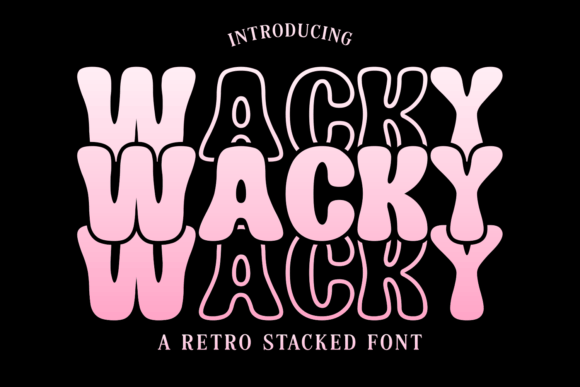
Sometimes, a project needs more than just legibility; it needs a spark. You know the feeling—when you have a great concept, but the standard sans serif or classic serif font makes it feel too corporate or overly serious. This is where Wacky enters the conversation. It is a premium font designed specifically as a display typeface, meaning it is crafted for those high-impact moments like headlines, logos, and posters rather than long-form body text. With its cute and quirky aesthetic, Wacky offers an incredibly joyful touch that can transform a flat design into something memorable and full of personality.
Defining the Visual Personality
Wacky isn’t just a name; it’s a description of the font’s DNA. When you look at the letterforms, you immediately notice the playful irregularity. It avoids the rigid geometry of modern typography, opting instead for soft curves, uneven baselines, and slightly exaggerated proportions. This creates a handwritten font feel, but with the polish and consistency of a professional display font. It strikes a balance between being childish and sophisticated enough for commercial use. It feels approachable and warm, making it an ideal choice for projects that need to connect with an audience on an emotional level. It doesn't take itself too seriously, which allows your brand identity to feel more relaxed and friendly.
Where Wacky Truly Shines
Because of its distinctive visual style, Wacky is best utilized in scenarios where brevity and impact are key. Think about the first thing a visitor sees on a landing page or the main title on a product package. In packaging design, for example, Wacky can help a product jump off the shelf. Imagine a gourmet popcorn brand or a children’s toy line; this typeface instantly communicates fun and flavor. Similarly, in logo design, Wacky works beautifully for brands that want to position themselves as creative, youthful, or artisanal. It suggests that the brand is human-centric and values creativity over rigid corporate structure.
It also translates exceptionally well into the digital space. For social media graphics, where you have roughly three seconds to stop a user from scrolling, the unique silhouette of Wacky grabs attention immediately. It is perfect for Instagram stories, Pinterest pins, and YouTube thumbnails. In web design, it serves as a fantastic accent font. While you wouldn't use it for your navigation menu or your blog post body (readability concerns there), it is perfect for hero sections and call-to-action buttons where you want to inject some energy.
Practical Application and Design Strategy
Using a creative font like Wacky effectively requires a bit of strategy. The most important rule of thumb is contrast. Because Wacky is a display typeface with a lot of visual movement, it needs to be grounded by something stable. This is where font pairing becomes critical. You generally want to avoid pairing Wacky with other highly decorative fonts, such as a complex script font or another busy handwritten font, as this will create visual chaos.
Instead, look for balance. A clean, geometric sans serif font is often the perfect companion. The simplicity of the sans serif allows the personality of Wacky to take center stage without competing for attention. Alternatively, a simple, legible serif font can work if you are going for a look that mixes traditional elegance with a modern, quirky twist. Think of Wacky as the loud, enthusiastic friend at the party, and the sans serif as the calm, reliable one keeping things organized.
Evaluating Project Fit and Readability
Before committing to Wacky, it is helpful to evaluate the specific context of your project. Ask yourself what the primary goal of the text is. If the goal is to convey authority, seriousness, or high-tech precision, Wacky might not be the right fit. However, if the goal is to evoke happiness, nostalgia, or creativity, it is an excellent choice.
Readability is another key factor. While Wacky is designed to be legible as a display font, you should always test it at the size it will be viewed. A common mistake in editorial design is using a display font for pull quotes or sub-headers at too small a size, which can make the quirky details look like smudges. Ensure there is enough whitespace around the letters to let the unique shapes breathe. When used correctly, it improves the visual hierarchy of your page by clearly separating headlines from the informational body text.
Licensing and Professional Use
For designers, entrepreneurs, and small business owners, the practicality of design assets is paramount. When incorporating a premium font like Wacky into your toolkit, you are investing in a asset that can be used across multiple channels. It is vital to review the commercial licensing terms. Most professional fonts come with licenses that cover specific uses—desktop, web, and sometimes app or e-pub usage.
Ensure that the license covers your intended use. If you are a content creator or blogger using the font for your website headers, a web license is necessary. If you are a crafter or hobbyist looking to create physical goods like t-shirts, mugs, or wedding invitations to sell, you need a license that permits the creation of physical end products. Wacky is a versatile commercial font, but respecting the licensing ensures you can use it legally and ethically in your business.
Final Thoughts on Adding Character
In a digital landscape often dominated by minimalist, safe typography choices, Wacky is a breath of fresh air. It allows designers and business owners to step outside the box and inject a bit of personality into their work. Whether you are designing a flyer for a local community event, branding a new startup, or creating merchandise, this font offers a reliable way to make your designs stand out. It reminds us that design can be functional and fun. By thoughtfully integrating Wacky into your projects, you create a visual language that is engaging, memorable, and undeniably joyful.